Current App Store listing: Santa Joyride: Holiday Games
App Store checked October 30, 2026. The current description and screenshots are shown in this section. The original article and images following this section are preserved as historical material.

About this app
You have a good eye for holiday fun. Pick your adventure in Santa Joyride, a Christmas game filled with flying, decorating and board games you can enjoy at your own pace.
Guide Santa through winter skies, put together a new look for him, or gather friends around a holiday board. When you want a quieter moment, decorate a tree or a fireplace, then watch the snow settle in a little globe.
FLY WITH SANTA
– Hold to lift Santa’s sleigh and release to descend as you travel through a side-scrolling winter adventure.
– Collect coins, avoid obstacles and keep an eye on the timer as you make your way through each level.
– Explore 15 themed levels, from snowy routes and candy-colored caverns to a final winter challenge.
– Return to a favorite stage and put your timing to work on another run.
– Pick up vehicles and power-ups, take on bosses, and see how far your flight can go.
– Visit the Market to use saved coins on useful gear, including shields, boosters and spin tickets.
– Watch for chances to collect extra rewards, and use a second chance when you need another try.
– Follow your missions as you collect coins, cover distance and spend time in a vehicle.
CREATE YOUR OWN SANTA
– Mix hats, beards, boots, mittens, glasses and more in the Santa dress-up workshop.
– Drag pieces into place and try a classic Christmas look or a combination of your own.
– Use Undo and Redo while you experiment with different outfits.
– Save named Santa builds on your device and come back to your favorites.
– Share an editable Santa build or import one when you want to continue creating.
DECORATE FOR THE HOLIDAYS
– Trim a Christmas tree with ornaments, candy canes, lights, bows and gifts.
– Decorate a house with wreaths, garlands, lanterns and other festive touches.
– Add decorations to a cozy fireplace room with an animated fire, window and sleeping dog.
– Tap to place pieces, move them around, and use Undo or Redo as you make changes.
– Keep several named designs for Santa, the tree, house and fireplace on your device.
– Return to your current fireplace scene later, or save it as a separate design.
– Make a second tree for a different color scheme, or try a new look for the house without replacing your favorite.
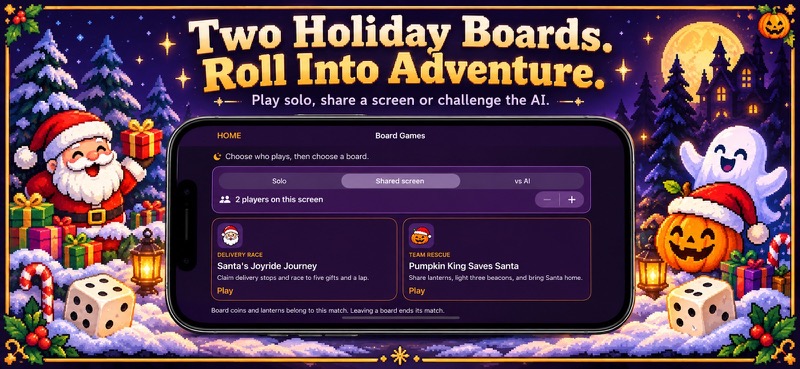
ROLL INTO TWO BOARD GAMES
– In Santa’s Joyride Journey, claim delivery stops, collect board coins and race to deliver five gifts and complete a lap.
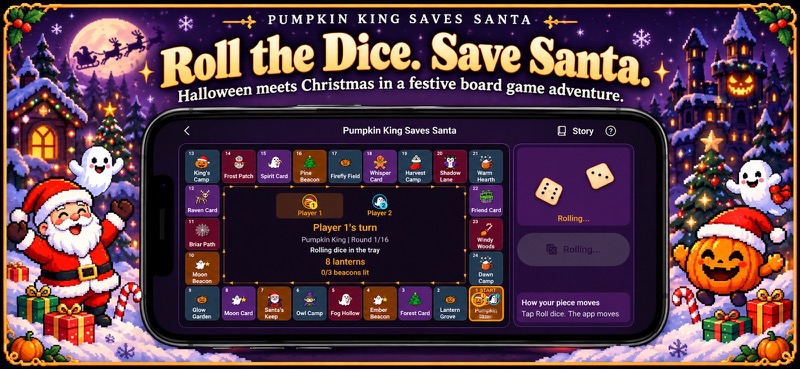
– In Pumpkin King Saves Santa, share lanterns, light three beacons and reach Santa’s Keep before dawn.
– Roll two dice, watch your piece follow the board and choose what to do when you land.
– Discover delivery stops, journey cards, helpful supplies and a few obstacles along the way.
– Check the story, rules and recent turns whenever you need a reminder.
PLAY YOUR WAY
– Take every turn in Solo mode, or share one screen with two to four players.
– Add one or two computer players for a competitive delivery race or a cooperative rescue.
– Keep multiple board matches on your iPhone or iPad and return to a saved game later.
– Pass the screen to the next player, follow the highlighted piece and read the landing message before deciding what to do.
– Shake or stir the Snow Globe, pause the scene and choose its lighting for a change of pace.
– Adjust music and sound effects to suit your play time. Reduce Motion is supported in selected activities.
Whether you have a few minutes for a flight or an evening for a board game, there is a little holiday adventure waiting for you. Thank you for playing and bringing your own ideas to Santa Joyride.
Optional in-app purchases are available. Saved board games and designs are stored on your device.
App Store Screenshots

Latest App Store Release Notes
You have a talent for making each adventure your own, and we’re glad you’re here. Thank you for using Santa Joyride! This update gives you more ways to return to the games and holiday scenes you’ve been creating.
SAVE MORE BOARD GAMES
– Start separate matches of Santa’s Joyride Journey and Pumpkin King Saves Santa.
– Find your saved games in the Board Games chooser and pick up the match you want to play.
– Keep different solo, shared-screen and computer-player matches on the same device.
– Your current player, board positions, supplies and turn are saved with each game.
– If you leave during a dice animation, return to the decided result and continue your turn.
– Delete a saved game when you are finished with it. You’ll be asked to confirm first.
– If a game cannot be saved, you can retry or choose whether to leave without saving.
– Choose another board from the game menu whenever you want to start a separate match. Your other saved games stay in the list.
MAKE THE FIREPLACE YOUR OWN
– Add wreaths, garlands, lights, gifts and other decorations to the fireplace room.
– Choose a decoration and tap the scene to place it, then drag it to a new spot.
– Select a piece to remove it, or use Undo and Redo when you want to try another arrangement.
– Your current fireplace scene is saved on your device as you edit, ready for your next visit.
– Save named fireplace designs, open a favorite or start a fresh scene.
– The animated fire, window and sleeping dog are still there when you want a quiet moment.
– Pause or resume the scene, with a still presentation available when Reduce Motion is on.
KEEP MORE SANTA DESIGNS
– Save several named Santa builds instead of keeping just one on your device.
– Restore a favorite outfit, make changes and save the updated version.
– Use Save As when you want to keep a different look alongside the original.
– Your earlier saved Santa remains available in the saved-build list.
– Share an editable build or import one when you want to continue working on it.
– Saved Santa builds keep their undo history, so you can step back through earlier changes.
SAVE YOUR TREE AND HOUSE
– Keep more than one named Christmas tree or house decoration design.
– Restore a saved scene, move pieces around and save your changes.
– Choose Save As to give a new arrangement its own name.
– Your previous tree and house saves remain available in their separate lists.
– Restore can be undone, giving you a way back to the scene you were editing.
– Choose Delete and confirm when you no longer want a saved design.
– Save your tree or house before leaving to keep your latest changes.
A LITTLE MORE ROOM TO PLAY
– The tree decorating view keeps its ornaments in three columns beside the scene.
– Short labels and brighter controls make it easier to choose decorations and see your options.
– The game-over screen shows when the spin limit has been reached.
– Picking up another chopper replaces the current one so its boost does not keep stacking.
– A restored score no longer adds extra distance to your distance missions.
– Music can use an available track when a level’s named track is unavailable.
– Keep your tree and house designs in separate lists, ready for their next makeover.
– Help in the holiday activities explains how to place decorations, save designs and return to them later.
Your saved board games and designs stay on the device where you created them. Keep a favorite Santa ready, return to a close board match, or decorate the fireplace in a whole new way.
Thank you for spending your time with Santa Joyride. Your creativity and thoughtful turns make every visit a little different, and we hope you enjoy finding your next favorite way to play.
App Store Information
- App Store category: Games
- Genres: Games, Family, Board
- Availability: Free
- Current version: 1.6
- Requires: iOS 17.6 or later
- Content rating: 12+
- Last updated: 2026-10-30
Developed by Verosocial. App details can change; verify the current App Store listing before publication.
Historical description