
Current App Store listing: Soccer Stats: Match Tracker
App Store checked October 30, 2026. The current description and screenshots are shown in this section. The original article and images following this section are preserved as historical material.

About this app
Thank you for using Soccer Stats to support your players and follow their progress. You’re putting time, care and encouragement into every match. Track soccer stats, plan tactics, and review playing time. Keep your teams organized, from practice to the final whistle.
FOLLOW THE MATCH
– Record goals, assists, shots, saves and cards.
– Keep the score and clock visible as you enter events.
– Pause playing time, manage halftime breaks and resume when play restarts.
– Review the event timeline, correct a mistake or Undo a saved action.
– Use Parent mode for one player or Goalkeeper mode for saves, shots faced and keeper minutes.
MAKE PLAYING TIME EASIER TO REVIEW
– Track playing, bench and goalkeeper minutes.
– Record several substitutions together at the same match time.
– Include late arrivals, early departures and changes in availability.
– Review optional equal-time targets before deciding your next change.
– Prepare rotation plans and confirm substitutions when they happen. Optional reminders prompt you; you stay in control.
PREPARE YOUR NEXT GAME
– Set up 4v4, 5v5, 7v7, 9v9 or 11v11 with halves or quarters.
– Reuse saved players and teams, paste a roster or preview a CSV import.
– Review attendance and choose today’s starting lineup.
– Keep several stopped match drafts and return to each when ready.
– Leave a draft with autosave, or reopen a running match to continue. Leaving the screen does not pause the clock. One match clock can run at a time. Check save errors as you work.
PLAN TRAINING AND TACTICS
– Build training sessions from the drill library or create custom exercises.
– Arrange drills, durations, equipment, instructions and illustrations.
– Save practice plans and reopen them from Saved sessions.
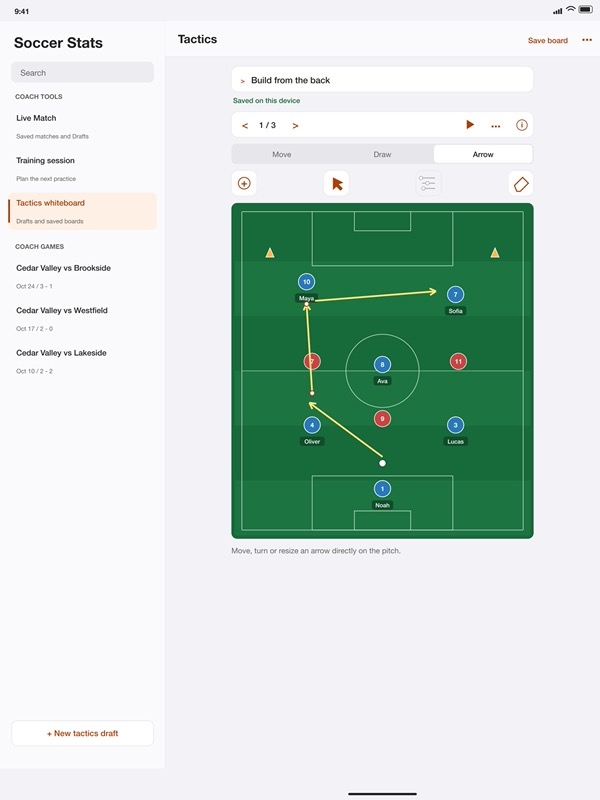
– Use the tactics whiteboard for players, opponents, balls, cones, arrows and freehand lines.
– Move an arrow directly, adjust its head or tail and build a sequence of frames.
– Keep separate tactics drafts with autosave, then reopen a board when you need it.
– Import or export a single session or board to Files.
SEE MORE AFTER THE WHISTLE
– Compare a player’s recorded events with team totals in Match statistics.
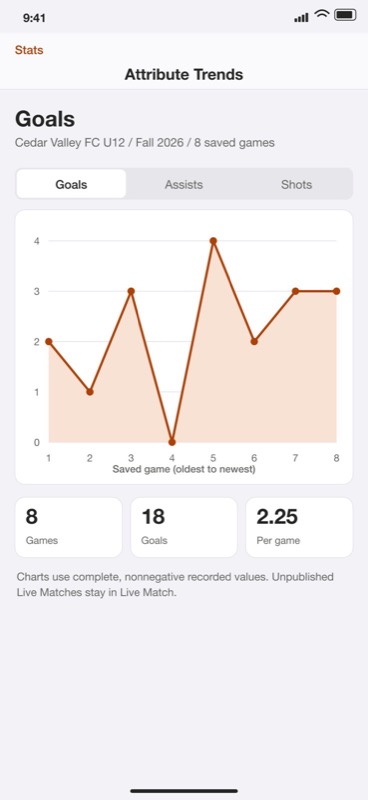
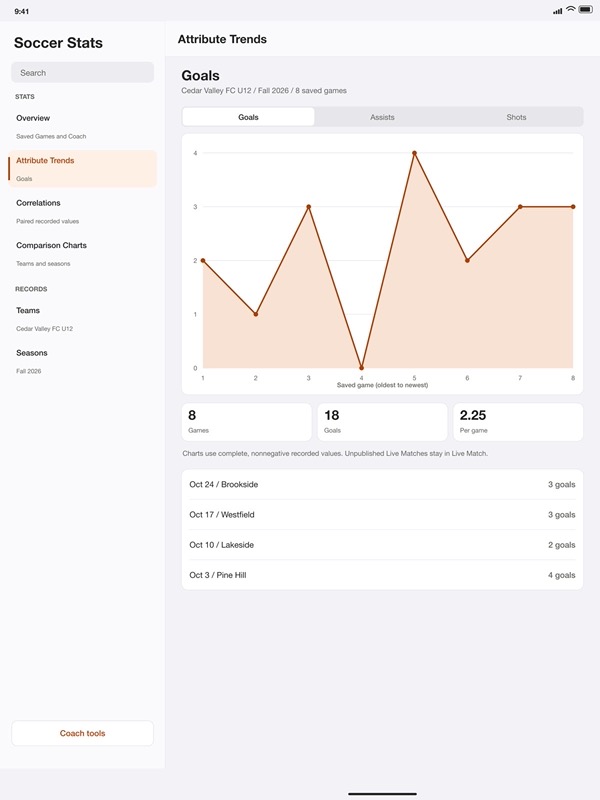
– Review Stats by team, season and game, with charts for recorded performance.
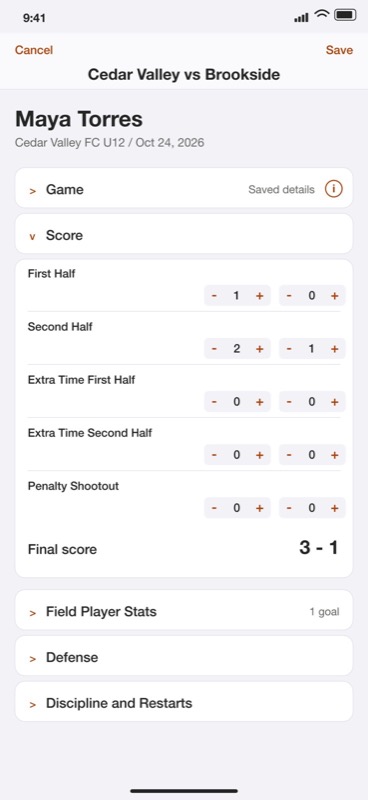
– Keep detailed manual Games and Coach scorebooks alongside Live Match.
– Save an eligible finished Live Match to Stats when you choose.
– Preview PDF or image reports before sharing. Player Only leaves other players’ details out of that report.
KEEP YOUR RECORDS IN YOUR HANDS
– Save players, teams, seasons, venues, competitions and awards for reuse.
– Keep local player contacts and review details before importing.
– Create a complete backup and review Keep Both, Merge or Replace when restoring.
– Include saved training sessions, tactics boards and locally saved drafts in your complete backup.
– Export selected records separately from complete backups and match reports.
– Use English or Spanish, with light, dark or system appearance.
– Track one individual game locally on Apple Watch and share its text summary. The Watch game stays separate from your iPhone and iPad records.
YOUR CHOICE OF ACCESS
Your first 30 app uses include creating, editing, importing and restoring records on iPhone and iPad. After that, Soccer Pro is required for further changes. Every saved record remains available to view and export without Pro, including reports and complete backups. Choose monthly or lifetime access. Monthly access renews until canceled; a lifetime purchase does not cancel an existing subscription. Review prices and terms before buying.
For monthly subscriptions:
Monthly Pro is a 1-month auto-renewable subscription.
Terms of Use (EULA): https://www.apple.com/legal/internet-services/itunes/dev/stdeula/
App Store Screenshots
Latest App Store Release Notes
Thank you for using Soccer Stats. You’re putting care into following your players and recording their progress.
This update brings more ways to prepare, record and review matches for one player or your team.
PREPARE FOR KICKOFF
– Choose Coach, Parent or Goalkeeper mode for the match you want to follow.
– Set up 4v4, 5v5, 7v7, 9v9 or 11v11 team games, with halves or quarters and the playing time you need.
– Add the opponent, season, competition, field and kickoff time for useful context.
– Select saved players, add names, or import a roster. Review the names and column choices before adding anyone.
– Confirm attendance, choose starters and name the opening goalkeeper before you start the clock.
– Save a draft to finish your preparation later, or review and share the setup with your assistant.
FOLLOW THE ACTION
– Select a player and record goals, assists, shots and goalkeeper events as they happen.
– Choose the event buttons you use most, keeping the match controls close at hand.
– Pause playing time, manage breaks and resume the clock when play continues.
– Track time on the field, time on the bench and time in goal. Pauses and breaks stay outside playing time.
– Apply several substitutions together at one match time, including a goalkeeper change when needed.
– Record arrivals and departures as availability changes. An arrival does not automatically put a player on the field.
– Review playing time suggestions and approve your own targets. Plan rotations and confirm every substitution yourself. Optional device reminders need your permission.
– Use Undo for a saved action, or open the event timeline to review what happened and correct an event.
– Finish the game, review the final totals and explain any manual correction before saving it.
KEEP YOUR SEASON TOGETHER
– Use Coach to enter statistics for several players in the same game and review the team totals.
– Keep player profiles, portraits and awards alongside your saved match records.
– Reuse saved teams, seasons, venues and competitions instead of entering the same details each time.
– Search and sort your games, then open the record you want to review or update.
– Save eligible finished matches to Stats and add summaries to season records.
REVIEW AND SHARE
– Explore totals, averages, game logs and charts to see how a player’s season is developing.
– Compare summaries by player, team, season and competition as you review your records.
– Prepare a match report, review its preview and choose a PDF or image to save or share.
– Choose Player Only to leave other children’s details, the saved match title and private notes out of the report.
– Share the team report when you want a wider view, and review the included player details before sending it.
– Keep reporting exports separate from full backups, so you can choose the right file for the task.
CONTACTS AND YOUR RECORDS
– Save local contacts and link them to player profiles. A shared contact can be used for more than one player.
– Choose contacts to import only when you want to, then review their details before saving local copies.
– Call or email from a saved contact and review the fields included before exporting a contact list.
– Create a full backup, inspect a saved archive and review additions, conflicts and removals before confirming a restore.
ON YOUR WATCH
– Keep one individual game on your Apple Watch, edit or remove it there, and share an export from its detail screen.
– Your Watch game stays independent of the games on your iPhone or iPad.
Includes 30 free uses for record changes. Every saved record remains available to view and export without Pro. Soccer Pro enables continued editing, imports and restoration after the allowance.
App Store Information
- App Store category: Utilities
- Genres: Utilities, Reference
- Availability: Free
- Current version: 5.5
- Requires: iOS 17.6 or later
- Content rating: 4+
- Last updated: 2026-10-29
Developed by Verosocial. App details can change; verify the current App Store listing before publication.
About this app
You give players your time, attention and encouragement. Thank you for using Soccer Stats to follow their progress. Whether you coach a youth team, support your child from the touchline or keep your own match records, that care matters.
Keep soccer scores, player statistics and team scorebooks together on iPhone and iPad. Prepare for kickoff, record the action and review the details after the final whistle.
FOLLOW THE MATCH
– Choose Coach for a team, Parent for one player or Goalkeeper for a keeper.
– Record goals, assists, shots, saves, shots faced and cards.
– Keep the match clock and score close to the action.
– Pause when needed and keep halftime breaks separate from playing time.
– Undo a saved action or review an entry in the event timeline.
LINEUPS AND PLAYING TIME
– Set up 4v4, 5v5, 7v7, 9v9 or 11v11, with halves or quarters.
– Confirm attendance and choose your starting lineup and goalkeeper.
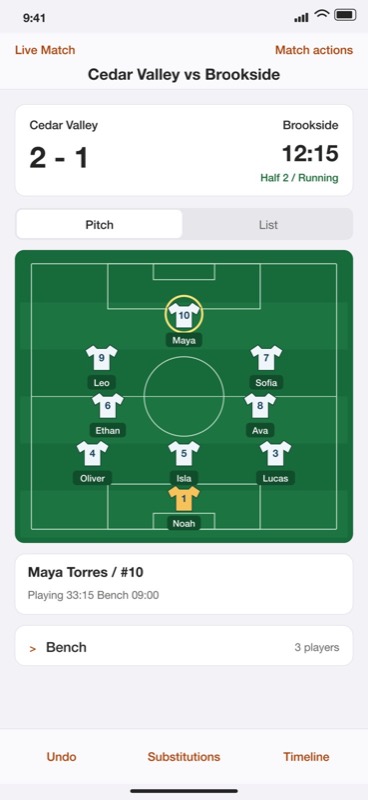
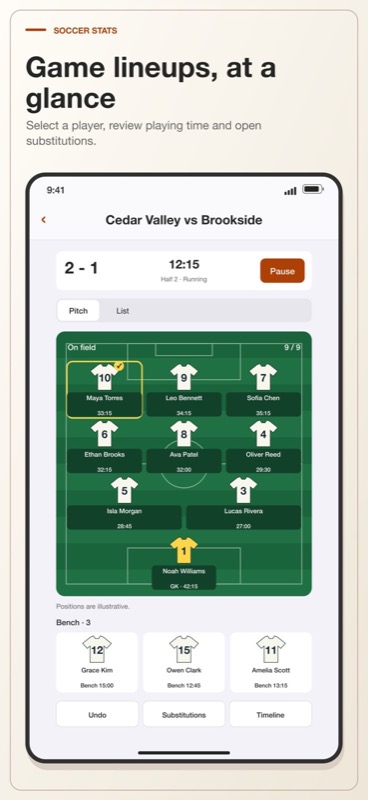
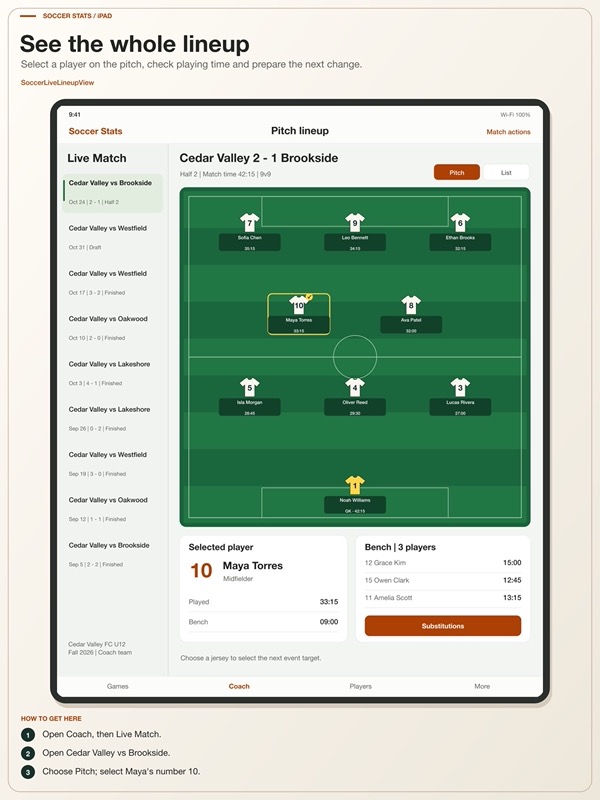
– View numbered jerseys, field players and substitutes on the pitch.
– Track time on the field, on the bench and in goal.
– Review a pregame substitution plan and projected minutes.
– Apply several substitutions together at one match time.
– Account for late arrivals, early departures and keeper changes.
– Review equal playing time targets and planned rotations.
You decide when players change. Plans and targets are guidance, and every actual substitution needs your confirmation. Optional device reminders need permission and depend on your device settings.
PLAN PRACTICE AND TACTICS
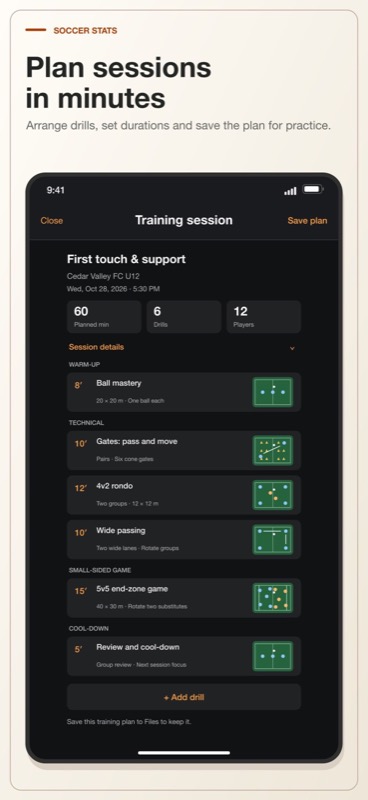
– Arrange warm-ups, passing drills, rondos and small-sided games.
– Start with a drill template or create your own exercise.
– Set durations, equipment, setup notes and coaching instructions.
– Review planned session time and illustrative pitch diagrams.
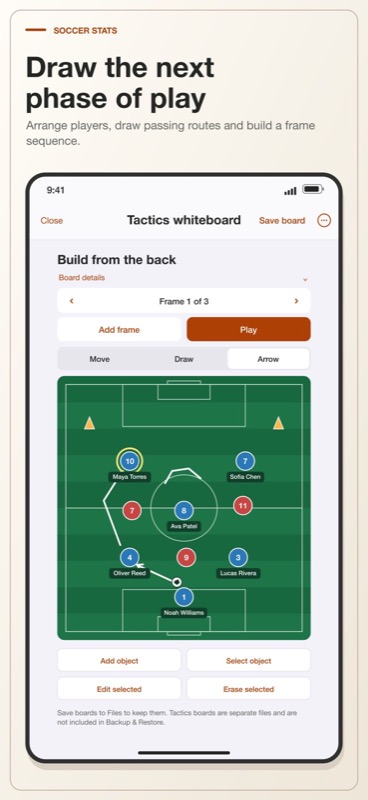
– Draw passing routes, arrows and freehand coaching diagrams.
– Add named players, opponents, balls and cones to the whiteboard.
– Copy frames, preview movement and undo board edits.
Save training plans and tactics boards to Files before closing. Open them again when you need them. These separate documents are not included in Backup & Restore.
BUILD A USEFUL SEASON RECORD
– Enter individual games or several players in a Coach scorebook.
– Add tackles, interceptions, clearances and other manual match stats.
– Keep player profiles, portraits, notes, awards and linked contacts.
– Reuse saved teams, seasons, competitions and venues.
– Review results, goals, assists, goalkeeper summaries and charts.
– Compare logged team events with one selected player’s contribution.
– Browse game logs and the Soccer Sheet table.
– Set a weekly goal in Habits.
SHARE AND KEEP YOUR RECORDS
– Preview match reports before sharing a PDF or image.
– Choose Player Only to leave other players’ details out.
– Export CSV or JSON records for your own use.
– Create a full backup and review restore choices before confirming.
Records stay local, with sharing under your control. Reports and ordinary exports are separate from full backups. Choose English or Spanish and System, Light or Dark appearance.
Apple Watch keeps one separate individual game, with local editing and a text export you choose to share. Watch records do not sync with iPhone or iPad.
For monthly subscriptions:
Monthly Pro is a 1-month auto-renewable subscription.
Terms of Use (EULA): https://www.apple.com/legal/internet-services/itunes/dev/stdeula/
App Store Screenshots
Latest App Store Release Notes
Your time and care make a difference to the players you support. Thank you for using Soccer Stats to follow the game and keep their progress in view.
Plan your practice, prepare for kickoff and review the action with tools for coaches, parents and goalkeepers.
SEE YOUR LINEUP ON THE PITCH
– Open Pitch in a Coach live match to see numbered jerseys, player names and playing time.
– Select a field player or substitute as the target for match events.
– See the current goalkeeper and available bench players together.
– Use the list layout when you need a full-name view. Pitch positions remain illustrative.
PREPARE SUBSTITUTIONS BEFORE KICKOFF
– Build a player-by-time plan in a stopped Coach draft.
– Review positions, field time, bench time and keeper minutes before play starts.
– Use Auto Plan as a starting point, then review each proposed change.
– Keep the starting goalkeeper while balancing planned field time.
– Return the reviewed plan to setup and save the match when ready.
– Planned minutes stay separate from recorded playing time. You still confirm actual substitutions during the game.
PLAN YOUR NEXT TRAINING SESSION
– Arrange drills in the order you want to run them.
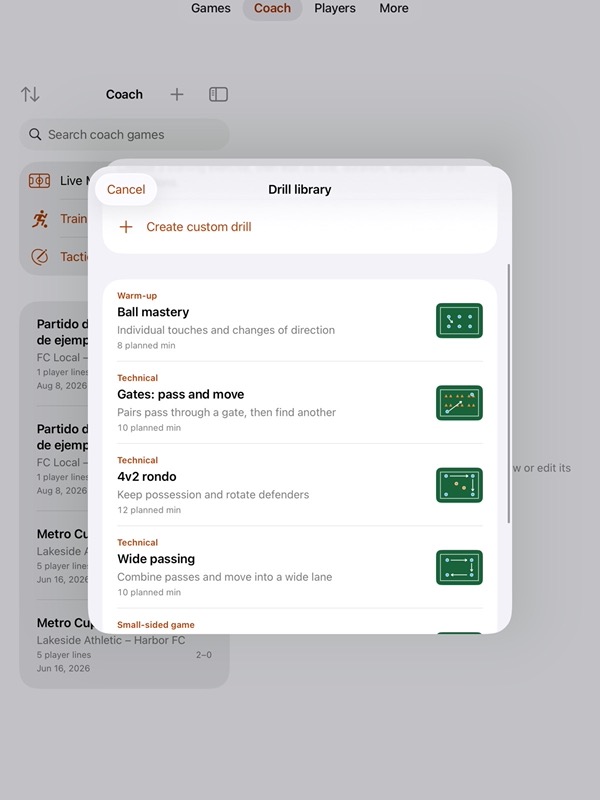
– Start with ball mastery, gate passing, rondos, wide passing or a small-sided game.
– Create custom exercises with equipment, setup notes and coaching instructions.
– Set each drill’s duration and review the total planned session time.
– Use the pitch illustrations to explain the exercise to your players.
– Edit, reorder or remove drills while keeping the rest of the session together.
– Save the plan to Files and open it again for your next practice.
DRAW AND PREVIEW TACTICS
– Place players, opponents, balls and cones on a coaching whiteboard.
– Add names and numbers, choose colors and adjust positions.
– Sketch freehand ideas or draw arrows for runs and passing routes.
– Copy a frame to plan the next part of the move.
– Play the frame sequence to preview changing positions.
– Undo or redo board edits and save your board to Files.
– Keep tactics diagrams separate from the live lineup and match statistics.
Training plans and tactics boards are separate Files documents. Save them before closing; they are not included in Backup & Restore.
REVIEW MATCH EVENTS AND CONTRIBUTIONS
– Compare recorded team totals with one selected player’s goals, assists, shots and keeper events.
– Read the score and player time alongside the comparison bars.
– Keep the coverage clear: the selected player is included in team counts, and only the opponent score is tracked.
– Review the event timeline, including substitutions, linked assists and clock actions.
– Correct an event or use Undo when the saved record needs attention.
– Review final totals and explain manual corrections without adding invented match events.
EDIT WITH MORE CONTROL
– Keep editing after an interrupted tactics drag.
– See a single-point freehand mark as a visible dot.
– Reorder training drills with the current session kept in view.
– Keep the current training plan if a selected file is invalid or too large.
– Review saved records again after restoring a backup before continuing old edits.
– Keep optional device reminders tied to the current match and your permission choices.
KEEP THE SEASON USEFUL
– Save eligible finished matches to Stats and review player and team progress.
– Preview a Player Only or team report before sharing a PDF or image.
– Keep linked local contacts with player profiles and review imported contacts before saving.
App Store Information
- App Store category: Utilities
- Genres: Utilities, Reference
- Availability: Free
- Current version: 5.3
- Requires: iOS 17.6 or later
- Content rating: 4+
- Last updated: 2026-10-26
Developed by Verosocial. App details can change; verify the current App Store listing before publication.