
Current App Store listing: American Football Coach 2026
App Store checked October 19, 2026. The current description and screenshots are shown in this section. The original article and images following this section are preserved as historical material.

About this app
Thanks for playing American Football Coach Game and joining us on the sideline. Bring your football knowledge to the huddle, call both sides of the ball, and follow the drive from the first snap to the final whistle.
This American football strategy game puts you in the coach’s seat. Choose a run on short yardage, test a coverage with a pass, or bring pressure on third down. Watch the clock and field position before deciding whether to punt, kick, or keep the offense out there.
CALL THE NEXT PLAY
– Start a one-time game, practice scrimmage, or season matchup.
– Choose runs, passes, and trick plays to suit the down and distance.
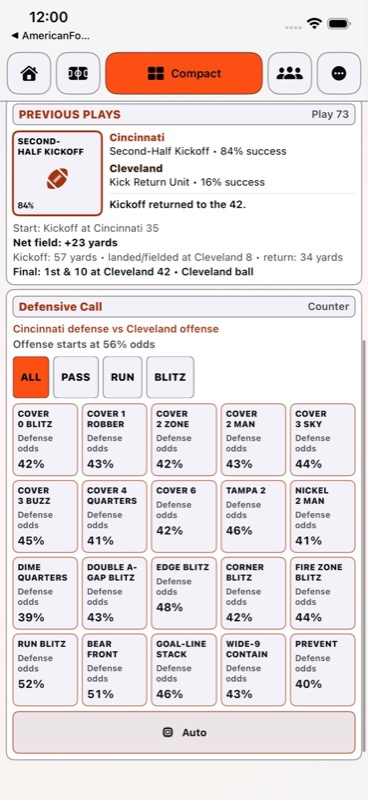
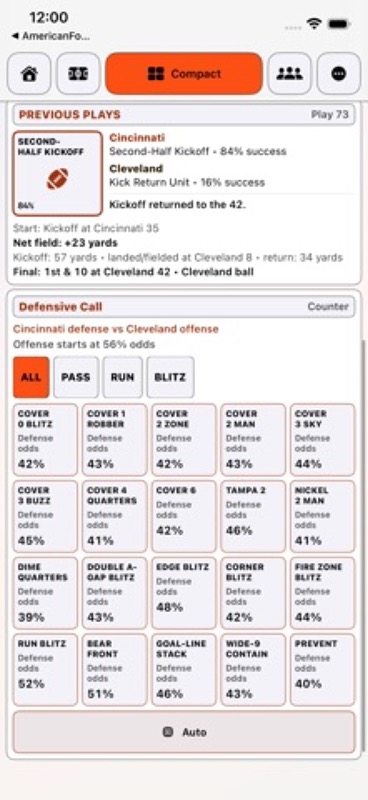
– Answer on defense with fronts, coverage, and blitz calls.
– Handle kickoffs, punts, field goals, and touchdown tries.
– Take a timeout when the next play needs a different plan.
– Play solo against an NPC (Non Playable Coach).
PUT TWO COACHES ON THE SIDELINE
– Share one iPhone with a friend.
– Player 1 coaches Home, while Player 2 takes Away.
– Follow Ready prompts when it is time to pass the phone.
– Lock in a run or pass, then hand over for the defensive choice.
– Keep the offensive call hidden until the defense commits.
– Hand over without spending the play clock.
KEEP YOUR EYE ON THE FIELD
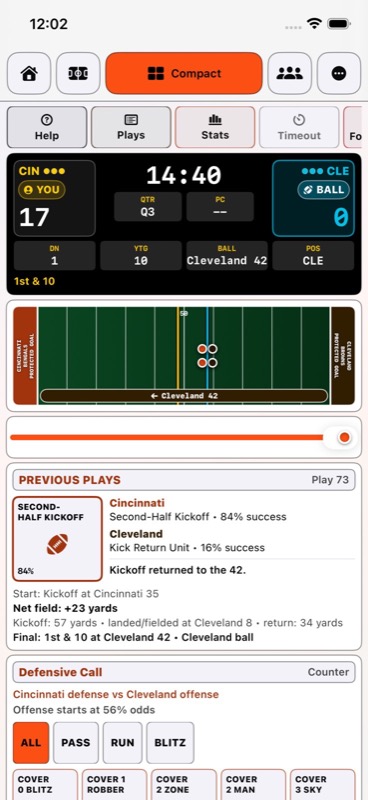
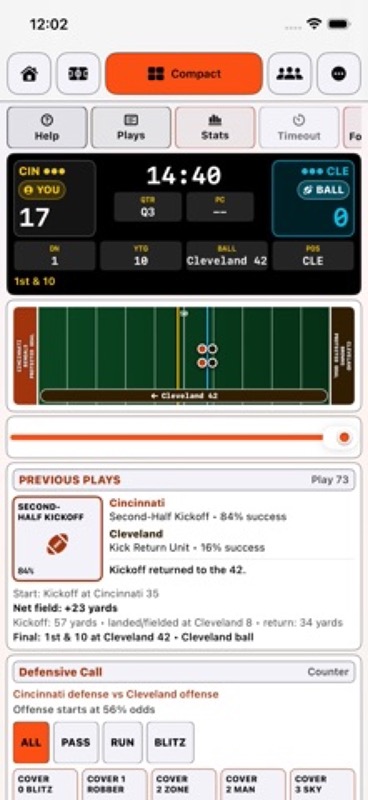
– Use Game for the full layout or Compact for a tighter view.
– Check team-colored scores, possession, quarter, and clock.
– Keep down, distance, ball position, and the next decision close.
– Read the latest call and result before choosing again.
– Open optional iPhone box-score and game details when needed.
– Enlarge the iPhone field or look back through Previous Plays.
READ THE GAMEBOOK
– Follow play-by-play, drive summaries, and quarter scoring.
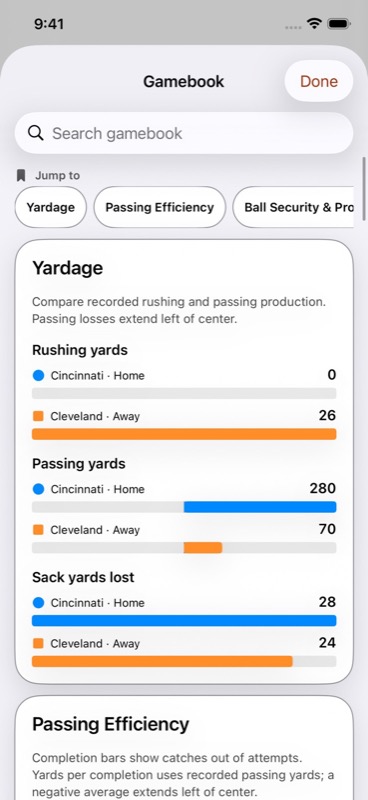
– Compare passing, rushing, first downs, sacks, and turnovers.
– Check team efficiency while the game is still in progress.
– Search iPhone gamebook sections and jump to the numbers you want.
– Compare possession, yardage, and scoring in iPhone charts.
– Use iPhone Field Charts to review position and possible first downs.
– Revisit both teams’ calls after a completed play.
TAKE THE SEASON ONE MATCHUP AT A TIME
– Work through a 17-game regular season and the playoffs.
– Reach the Trophy Game and keep championships in your Trophy Room.
– Save an unfinished matchup and return to the next decision.
– Keep season games and one-time matchups in your game library.
WORK ON YOUR PLAYBOOK ON IPHONE
– Search Play Styles & Odds for help with the next call.
– Explore West Coast, spread, power run, and trick-play approaches.
– Compare defensive fronts, coverage, and pressure.
– Check estimated matchup percentages as you weigh your options.
– Watch Full Game Demo or get quick results from Instant Game Demo.
– Build calls and outcomes in Replay Builder.
– Share field replays as PDFs or short animations.
TAKE THE SIDELINE ON APPLE WATCH
– Play complete solo games directly on Apple Watch.
– Check watch results, Plays, and Stats during the game.
– Keep unlimited watch saves and share a saved-game copy by choice.
– iPhone and Apple Watch each keep their own saved games.
On iPhone, free play includes one new game per day and up to five active games. Optional Football Pro removes those limits. Watch games have no daily game limit.
Play a few snaps during a break, test a different defense in a scrimmage, or settle in for a championship run. Set the music and game sounds in iPhone Settings, pick your matchup, and make the next call.
For monthly subscriptions:
Monthly Pro is a 1-month auto-renewable subscription.
Terms of Use (EULA): https://www.apple.com/legal/internet-services/itunes/dev/stdeula/
App Store Screenshots
Latest App Store Release Notes
You know when a drive needs a different call. Thanks for playing American Football Coach Game and bringing your football knowledge to the sideline. This update puts clearer TV feedback and tighter game screens into your next matchup.
CLEARER CONTROLS ON APPLE TV
– Button labels stand out against their backgrounds.
– See a clear outline around the control selected with your Siri Remote.
– Spot selected play groups and defensive filters.
– Read timeout, save, review, and forfeit controls with stronger contrast.
– Find the same button treatment in setup, Saved Games, Seasons, and help.
– Keep your selected page or play clear while browsing Stats & Plays.
– Tell available actions from disabled ones before making your next selection.
MORE FOOTBALL IN TV COMPACT
– A smaller command row leaves more room for the game.
– Tighter team score cells keep possession and player labels in view.
– Read quarter, play clock, down, distance, ball spot, and possession together.
– Use a shorter field that still shows both end zones and yard numbers.
– See the latest result and next play side by side.
– Choose calls from a tighter grid with less space around each play.
– Switch between Game and Compact to keep playing the same matchup.
FOLLOW THE PLAY ON THE TV FIELD
– See play messages in solo and same-device two-player games.
– Read the result and extra detail, or select Dismiss to return your attention to the field.
– A countdown shows how long a play message stays on screen.
– See when more play updates are waiting to be shown.
– Track gains with straight arrows, passes with arcs, and losses with red paths.
– Notice a brief ball bounce and field pulse after a completed play.
– Get the same field feedback in regular Game and Compact.
– Follow a pale-yellow line across the green field to the next first down.
– Use the cyan line to find the ball.
– Goal-to-go situations mark the goal line as your target.
– The field follows the play’s direction when possession or quarters change.
– Reduce Motion keeps the result arrow still and turns off the bounce.
– Return to a game without replaying older movement effects.
LESS SCROLLING ON IPHONE
– Game now has tighter card spacing and a smaller action bar.
– Keep Plays, Stats, and the current game actions close at hand.
– Expand Box Score when you want points by quarter and total.
– Read both teams beneath one shared quarter header.
– Open Game Details for ball position, drive, timeouts, and win chance.
– Keep the next decision and latest result visible outside those details.
– Use section shortcuts to open the detail you want.
– See smaller formation diagrams with the play calls.
– Waiting, touchdown-try, and final screens show the current situation.
TWO COACHES, ONE GAME
– Share an iPhone or Apple TV from the coin toss to the final whistle.
– Player 1 coaches Home, and Player 2 coaches Away.
– Ready prompts tell you when to pass the phone or Siri Remote.
– The play clock waits while you hand over.
– Call a run or pass, then let the other coach choose a defense.
– The offensive call stays hidden while the defense decides.
– Ready prompts take priority over temporary play messages.
– Continue a saved two-player matchup with a fresh handoff prompt.
A PLAYBOOK THAT SPEAKS YOUR LANGUAGE
– Computer opponents are named NPC (Non Playable Coach).
– Updated help explains solo play, shared-device games, and the current controls.
– TV help explains the ball line, first-down target, arrows, and play messages.
– iPhone field charts use familiar yard numbers up to 50 and back down.
Thanks for being part of the huddle. Pick a matchup, take the sideline, and see what your next call does for the drive.
App Store Information
- App Store category: Games
- Genres: Games, Sports, Simulation, Entertainment
- Availability: Free
- Current version: 1.3
- Requires: iOS 17.6 or later
- Content rating: 9+
- Last updated: 2026-10-19
Developed by Verosocial. App details can change; verify the current App Store listing before publication.
Call offense and defense, manage games and seasons, and track team stats in a fast football strategy game.
Who it is for
Designed for football fans who want to make coaching decisions in a mobile game.
What it helps with
It helps people try the pressure and tradeoffs of coaching instead of only watching a score.
App Store Screenshots
Latest App Store Release Notes
Thank you for playing American Football Coach 2026. Your sharp calls and close attention to each drive are why we keep making this game easier to play and easier to read. This update brings more of the action into view, especially when you are playing on Apple Watch.
APPLE WATCH GAME
– Play a separate football game on Apple Watch without opening the iPhone app.
– Keep watch games in their own saved-game list and return to an unfinished matchup.
– Make offensive, defensive, special-teams, timeout, and touchdown-try decisions on the watch.
– See the latest play result above the next set of calls, where it is easier to spot.
– A slimmer watch scoreboard leaves room for the next result on small watch screens.
– Tap that result to read the full play when a short summary is not enough.
– Open Plays for a newest-first play-by-play log and the details of each snap.
– Open Stats during a game for team numbers, quarter scoring, and the current drive.
– Keep as many watch games as you want, with no daily watch game limit.
– Watch saves keep the score, clock, possession, and next decision ready when you return.
– Share a portable saved-game file through the watch share sheet when you choose.
– Watch games stay separate from iPhone games unless you decide to share a file.
CLEARER PHONE PLAY
– The Compact game screen keeps the scoreboard, call, result, and next situation close together.
– Home puts active and saved matchups closer to the top, with fewer repeated panels.
– Previous Plays makes it easier to review a drive and follow where the ball moved.
– The gamebook shows more of the story behind the score, from quarter points to drive history.
– See the result sooner after calling an offensive play.
– Game results and season messages use plainer football language throughout the app.
– Kickoff, conversion, and overtime moments now describe the event you actually see.
MORE WAYS TO EXPLORE
– Play Styles & Odds is easier to search when you want help with a call.
– Compare offensive approaches such as West Coast, spread, power run, and trick plays.
– Find guidance for defensive fronts, coverage, pressure, and common game situations.
– Check the current matchup’s odds before deciding which call fits.
– Watch a paced Full Game Demo or get quick results from Instant Game Demo.
– Build a sequence of calls and outcomes in Replay Builder, then review it on the field.
– Revisit saved-game plays without changing the game you are still playing.
– Share a field-only replay or short animated recap when a drive is worth keeping.
– Follow a play’s down, distance, yardage, and result as it moves across the field.
SEASONS, SAVES, AND SOUND
– Continue a saved matchup from the game library without repeating setup.
– Saved-game actions are easier to reach for renaming, moving, duplicating, and sharing.
– Follow a 17-game regular-season path toward the playoffs and Trophy Game.
– See earned championship wins in the Trophy Room.
– Find Football Pro, League, demos, Settings, and the strategy guide in More.
– Hear background music across menus and games, with brief cues for key moments.
– Use Settings to control music and game sounds separately.
After an onside recovery, the recovering team keeps the ball without another kick interrupting the drive. Penalty yards and first downs follow the ball spot. Run plays, passes, and special teams affect the clock differently, so the pace follows the call.
Check the box score while a game is in progress, look back at the play that changed a drive, then return to your next call. You can also put the watch away and pick up a saved game later.
Thanks for playing and for noticing the details. Keep calling the game your way.
App Store information
The current Apple listing describes offense and defense play calling, saved games, season progress, and team statistics.
- App Store category: Games
- Genres: Games, Sports, Simulation, Entertainment
- Availability: Free
- Current version: 1.2
- Requires: iOS 17.6 or later
- Content rating: 9+
- Last updated: 2026-09-28
View American Football Coach 2026 on the App Store
Developed by Verosocial. App details can change; verify the current App Store listing before publication.